
Game
Binary Game — Learn Binary Numbers by Playing
Learn binary by playing: flip bit cards to make a number, read and write binary, race a 60-second challenge and build streaks, across five levels from 4 to 8 bits.
Updated · Free, no sign-up
Decimal to binary: turn cards on until they add up to the number.
Level 1: 4 cards, numbers up to 15.
Score 0 · Streak 0 · Best streak 0
Flip the cards to make
5
0000 = 0
Keyboard: 1–4 flip the cards from the left, H gives a hint, Esc clears. Records are saved in this browser only.
Share this game
Know someone who’d love it?
How to play the binary game
The binary game is a free number game for learning to read and write binary, the number system computers use. Each card is worth a power of two (1, 2, 4, 8 and so on), a card that is on counts as 1 and a card that is off counts as 0. Once you can add up the cards in your head, you can read any binary number. There are four ways to play:
- Flip the bits (decimal to binary): a number appears, and you tap cards to turn them on until they add up to it. As soon as the total is right, the next number comes up. The running total under the cards turns red when you have gone too high.
- Read the binary (binary to decimal): you see a binary number on the cards and type its value in ordinary numbers.
- Write the binary (decimal to binary, typed): you see a number and type it in 0s and 1s. Leading zeros and spaces are fine, so
0101and101both count for 5. - Learn: no target and no score. Flip any card and watch the binary, decimal and hex values change, or press +1 and −1 to count up and down and see how the bits roll over.
Levels, streaks and the 60-second challenge
There are 5 levels, from 4 bits to 8 bits (a full byte). Each level adds one card and doubles the range of numbers:
| Level | Cards | Card values | Numbers |
|---|---|---|---|
| Level 1 | 4 bits | 8 4 2 1 | 1 to 15 |
| Level 2 | 5 bits | 16 8 4 2 1 | 1 to 31 |
| Level 3 | 6 bits | 32 16 8 4 2 1 | 1 to 63 |
| Level 4 | 7 bits | 64 32 16 8 4 2 1 | 1 to 127 |
| Level 5 | 8 bits | 128 64 32 16 8 4 2 1 | 1 to 255 |
In practice mode there is no clock: take your time, use Hint when you are stuck (it lights up the leftmost card that is wrong and says whether to turn it on or off) or Skip to see the answer. Your streak counts correct answers in a row, and your best streak for each mode and level is kept. Hints and skips reset the streak, so a long streak means you really know it.
Check 60-second challenge and press Start to race the clock: solve as many numbers as you can before time runs out. Your best score for each mode and level is saved, so you can try to beat your high score later. Scores and streaks are stored only in your own browser, never on our server, and clearing your browser data resets them.
Keyboard shortcuts
| Key | What it does |
|---|---|
| 1 to 8 | Flip the cards from the left (Flip the bits and Learn) |
| H | Show a hint (Flip the bits) |
| Esc | Turn all the cards off |
| + and − | Count up and down by one (Learn) |
| Enter | Check your typed answer, or start a timed round |
How binary numbers work
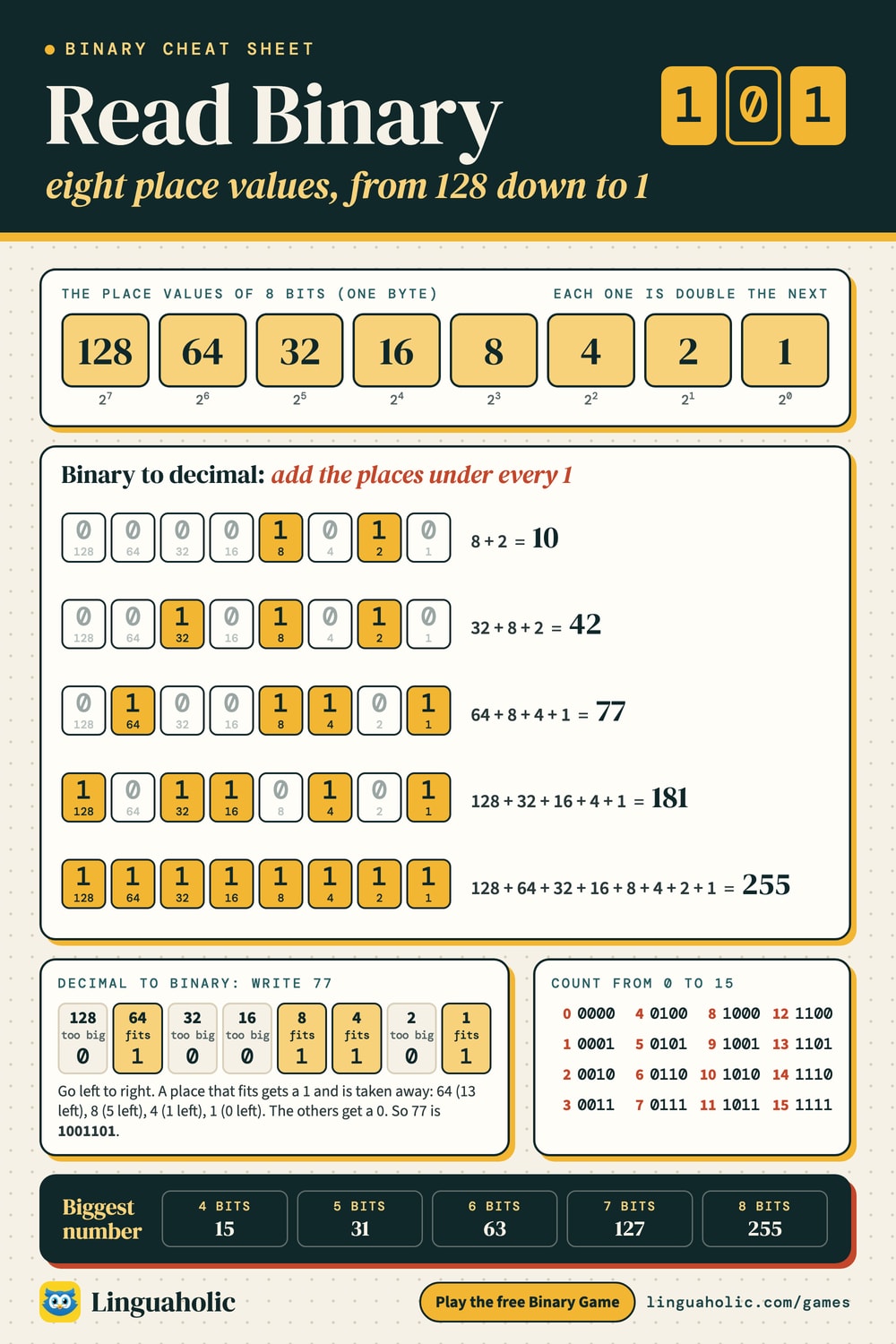
In everyday numbers each place is worth ten times the place to its right: ones, tens, hundreds. Binary uses only the digits 0 and 1, and each place is worth twice the place to its right. Those place values are the numbers on the cards. For one byte (8 bits) they are:
| Bit position | 7 | 6 | 5 | 4 | 3 | 2 | 1 | 0 |
|---|---|---|---|---|---|---|---|---|
| Power of 2 | 27 | 26 | 25 | 24 | 23 | 22 | 21 | 20 |
| Value | 128 | 64 | 32 | 16 | 8 | 4 | 2 | 1 |
Each extra bit doubles how many numbers you can make. Four bits give the numbers 0 to 15, and eight bits give 0 to 255. A useful pattern: the biggest number with a given number of bits is always one less than the next card. All four cards on, 1111, is 16 − 1 = 15.
How to read binary: place value chart

How to read binary (binary to decimal)
To read a binary number, write the place values over its digits and add up the ones that sit over a 1. Take 10110101:
| Value | 128 | 64 | 32 | 16 | 8 | 4 | 2 | 1 |
|---|---|---|---|---|---|---|---|---|
| Bit | 1 | 0 | 1 | 1 | 0 | 1 | 0 | 1 |
So 10110101 is 128 + 32 + 16 + 4 + 1 = 181. With practice you stop adding every card and start seeing chunks: the left four bits 1011 are 11 sixteens (176) and the right four 0101 are 5, so the total is 176 + 5 = 181.
How to write a number in binary (decimal to binary)
The quickest way in your head is the one the game trains: start with the biggest card that fits, take it away, and repeat with what is left. Here is 77 in 8 bits:
| Card | Does it fit? | Bit | Left over |
|---|---|---|---|
| 128 | no | 0 | 77 |
| 64 | yes, take it | 1 | 13 |
| 32 | no | 0 | 13 |
| 16 | no | 0 | 13 |
| 8 | yes, take it | 1 | 5 |
| 4 | yes, take it | 1 | 1 |
| 2 | no | 0 | 1 |
| 1 | yes, take it | 1 | 0 |
Reading the bits down the table gives 01001101, and 64 + 8 + 4 + 1 = 77.
The division method
On paper there is a second method that works for any size of number: divide by 2 again and again and write down the remainders. Then read the remainders from the bottom up:
| Number | ÷ 2 | Remainder |
|---|---|---|
| 77 | 38 | 1 |
| 38 | 19 | 0 |
| 19 | 9 | 1 |
| 9 | 4 | 1 |
| 4 | 2 | 0 |
| 2 | 1 | 0 |
| 1 | 0 | 1 |
Bottom up, the remainders spell 1001101, the same answer. The Binary Converter shows this table for any number you type.
Counting in binary from 0 to 15
Counting in binary follows one rule: the rightmost card flips every time, the next one every second time, the next every fourth time, and so on. Try it in Learn mode with the +1 button and watch the pattern ripple to the left:
| Decimal | Binary | Cards that are on |
|---|---|---|
| 0 | 0000 | none |
| 1 | 0001 | 1 |
| 2 | 0010 | 2 |
| 3 | 0011 | 2 + 1 |
| 4 | 0100 | 4 |
| 5 | 0101 | 4 + 1 |
| 6 | 0110 | 4 + 2 |
| 7 | 0111 | 4 + 2 + 1 |
| 8 | 1000 | 8 |
| 9 | 1001 | 8 + 1 |
| 10 | 1010 | 8 + 2 |
| 11 | 1011 | 8 + 2 + 1 |
| 12 | 1100 | 8 + 4 |
| 13 | 1101 | 8 + 4 + 1 |
| 14 | 1110 | 8 + 4 + 2 |
| 15 | 1111 | 8 + 4 + 2 + 1 |
Tips to get faster
- Learn the card values by heart: 1, 2, 4, 8, 16, 32, 64, 128. Saying them aloud a few times is enough for most players.
- Odd numbers always need the 1 card, and even numbers never do. Set the last card first and you have one less to think about.
- Work from the left. Ask “does the biggest card fit?” and move right. You never need to go back and change a card you already decided.
- Know the landmarks. 15 is
1111, 16 is10000, 255 is11111111, and every power of two is a 1 followed by zeros. - Split a byte into two halves. The left four cards count sixteens and the right four count ones, so you only ever add two numbers from 0 to 15.
- Build a streak before you race. In practice mode, aim for a streak of ten without hints, then switch on the 60-second challenge at the same level.
Common mistakes when learning binary
- Reading 10 as ten. In binary,
10is two and100is four. Saying “one zero” instead of “ten” keeps the two number systems apart. - Starting from the wrong end. The smallest card, worth 1, is always on the right. A binary number is read left to right like any other number, but the place values grow from right to left.
- Dropping the zeros in the middle. 77 is
1001101, not1111. Every card you skip still needs its 0, or the cards to its left slide into the wrong places. Zeros at the very front, on the other hand, change nothing:0101is still 5. - Doubling wrong past 64. The sequence goes 64, 128, 256, 512, 1024. Write it out once if you are unsure; every value is the one before it added to itself.
A binary game for kids and classrooms
Binary is part of many school computing courses, and cards are the classic way to teach it, because children can see that a number is just some cards turned over. The game works on a classroom screen, a tablet or a phone, needs no sign-up, and stores nothing about the players.
Teaching tips
- Start with real cards. Before the screen, hand five students a paper card each, marked 16, 8, 4, 2 and 1, and stand them in a row. Call out a number and let the class decide who turns their card over. Then move to the game, which plays exactly the same way.
- Use Learn mode to explain. On the board, press +1 slowly from 0 to 15 and ask what happens to the rightmost card each time, then the next one. Students discover the doubling pattern themselves.
- Play as a whole class. Put Flip the bits on the projector and let students call out which card to flip. Ask them to explain why, using “Does 8 fit into 13?” language.
- Pairs and stations. One student plays, the other checks with the place values. Swap after five numbers.
- Differentiate with levels. Level 1 (4 bits) suits beginners; confident students move up a level when they can keep a streak of ten. Turn off “Show place values” for an extra challenge.
- Finish with the challenge. A 60-second round makes a good warm-up or wrap-up. Students record their best score and try to beat it next lesson, which keeps the competition with themselves rather than each other.
- Link it to the real world. One byte holds the numbers 0 to 255, which is why that number turns up in computing, for example in the red, green and blue values of a screen color.
Questions to ask the class: Why does every odd number use the 1 card? What is the biggest number you can make with 5 cards, and with 6? If you add one more card, what happens to the biggest number? (It doubles and adds one.)
Why learn binary?
Everything a computer stores, from text and photos to music, is kept as bits, and binary is how those bits become numbers. A single bit is a 0 or a 1, and eight bits make a byte. Letters are stored as numbers too: the capital letter A is number 65, which is 01000001 in binary. You can see the binary for any word with the Binary Translator, and the same numbers written in hexadecimal with the Hex to Text converter. Once reading binary feels easy, try adding and subtracting binary numbers with the Binary Calculator, which shows every carry.
Looking for more games? Hangman is a good next step for spelling practice.
For teachers, bloggers & clubs
Put the Binary Game on your website
Give your readers this game right on your page. Copy the code, paste it into your site, done: no sign-up, no account.
- Free for any website
- No ads, no cookies
- Fits phones and sidebars
- Always up to date
Please keep the small credit line under the game; you may add rel="nofollow" to its link. How it works & the rules

› Show the code
Frequently asked questions
- How do you play the binary game?
- In Flip the bits, tap cards worth 128, 64, 32, 16, 8, 4, 2 and 1 until they add up to the target number. In Read the binary you type the value of a binary number, and in Write the binary you type a number in 0s and 1s. Learn mode lets you flip cards freely.
- What are the levels?
- There are five: Level 1 uses 4 bits (numbers up to 15), then 5, 6 and 7 bits, and Level 5 uses a full byte of 8 bits (numbers up to 255). Each level adds one card and doubles the range.
- How does the 60-second challenge work?
- Check the 60-second challenge box and press Start, then solve as many numbers as you can before the clock runs out. Your best score for each mode and level is saved in your browser so you can try to beat it.
- What is a streak?
- Your streak counts correct answers in a row. A wrong answer, a hint or a skip resets it to zero, and your best streak for each mode and level is saved in practice mode.
- How do you convert binary to decimal?
- Add up the place values under every 1. For 10110101 that is 128 + 32 + 16 + 4 + 1 = 181. The game's cards show the place values so you can see the sum.
- How do you convert decimal to binary?
- Start with the biggest card that fits, take it away and repeat with what is left. For 77: 64 fits (13 left), then 8 (5 left), 4 (1 left) and 1, so 77 is 1001101.
- Is the binary game good for kids and classrooms?
- Yes. Level 1 uses only four cards, Learn mode shows place values and counting, and the game works on a projector, tablet or phone with no sign-up. The page has teaching tips for whole-class play.
- Can I play with a keyboard?
- Yes. Number keys 1 to 8 flip the cards from the left, H gives a hint, Esc clears the cards, + and − count in Learn mode, and Enter checks an answer or starts a timed round.
- Are my scores saved?
- Best scores and best streaks are saved in your own browser only. Nothing is sent to our server, and clearing your browser data resets them.
About this page
The Binary Game is a free game from Linguaholic, made by Marcel Iseli. It runs in your browser, with no sign-up. Last updated .
Keep exploring
More games & word tools
 Binary ConverterConvert between binary, decimal, hex, and octal as you type.
 Binary CalculatorAdd, subtract, multiply and divide binary with every carry, borrow and two's complement shown.
 Binary TranslatorConvert text to binary code and binary back to text.
 HangmanThe classic word-guessing game, with 48 categories and a 2-player mode.
 Categories GameA random letter, a list of categories, and a timer — on one screen or every phone.
 Imposter Game Word GeneratorRandom secret words for the Imposter game, each with a hint for the imposter.